One model. Written by people and agents.
Read by both.
Inwardis keeps what you know about a system as a hierarchical model, not a folder of drawings. It can come first, as the specification: people sketch it on a canvas, an AI agent fills it in over MCP, and the code is built from it, with references that point back into the model. Or it can come second: point an agent at whatever already exists — a codebase, a stack of documents, a process described in prose — and let it draw out what is hidden there into layers you can browse: an algorithm, a flow, the concepts of a domain. Either way, the model is where the understanding lives, and it outlives the chat session, the diagram and the sprint. It runs on your infrastructure.
For software and enterprise architecture (C4, UML), database design and business processes (BPMN). And because everything breaks down into layers, almost anything fits: a JSON payload, a mind map, an org chart, your whole product.
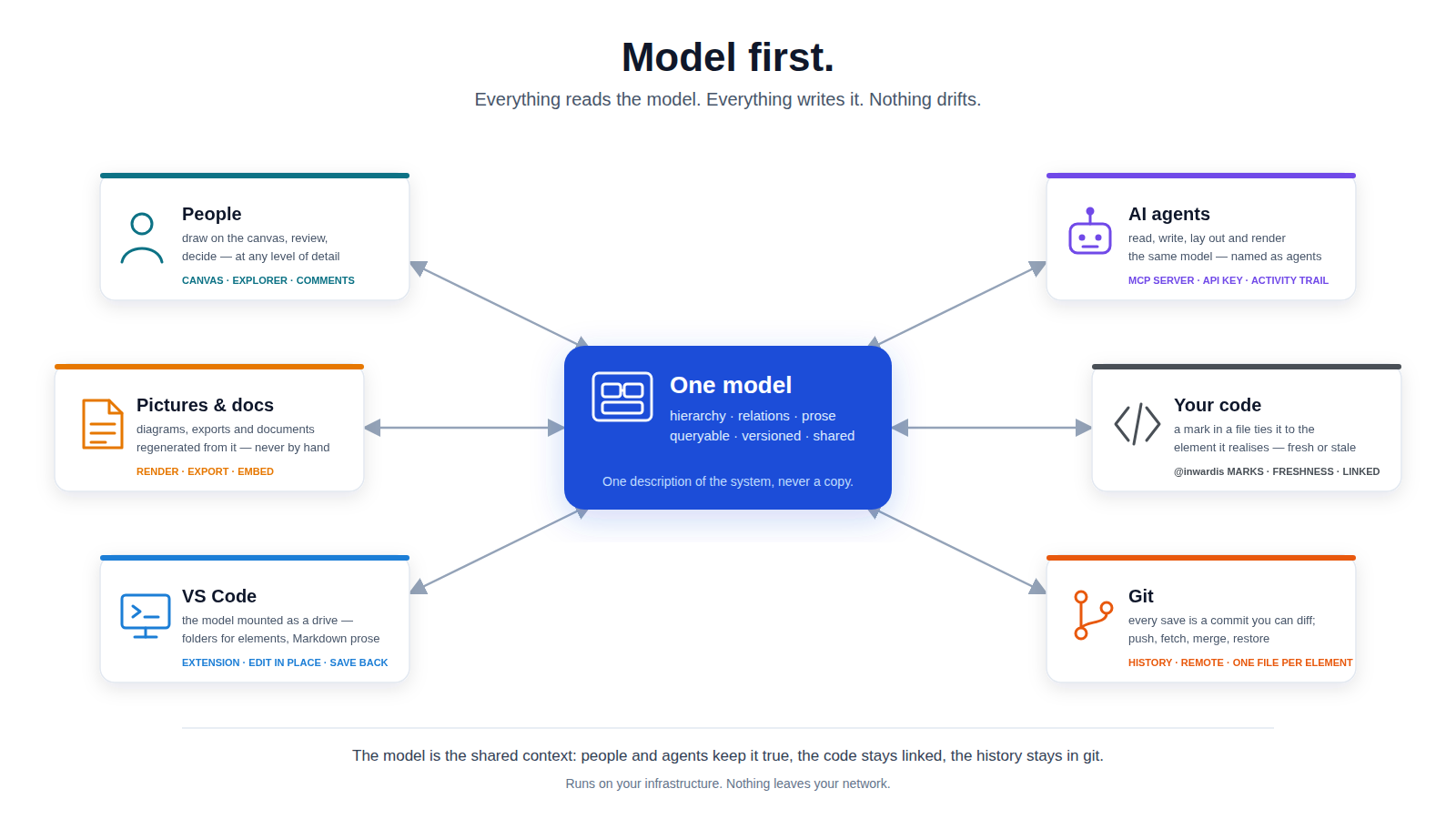
Diagrams go stale. Models don't have to.
A picture in a wiki is a dead end: nothing can read it, nobody can query it, and it is wrong three sprints after it was drawn. Ask an AI assistant about your architecture and it gets a screenshot, or a 200-page export it cannot fit in a context window.
Inwardis makes the model the artefact. Diagrams, documentation and exports are projections of it — generated, never maintained by hand. The unit of value is a model that stays true, not a diagram that was once drawn faster.
Your code says what.
Inwardis remembers why.
Code tells you what the system does today. It does not tell you why it is shaped that way, or what a change will reach. Inwardis keeps that in the model, linked to the code: a one-line mark in a file ties a class to the element that describes it, VS Code opens either from the other, and you see at a glance when the code has moved on since its description was last checked.
So after a month away, or once the system has grown past what anyone can hold in their head, you and your agent start from the same place: one element's link, and the context around it.
Built for large models
Anything works at ten elements. These are the things that decide whether a model is still usable at ten thousand.
Browsable layer by layer
Everything is hierarchy: every element can contain sub-elements, without limit. A reader — person or agent — opens a level, sees what matters there, and drills into one branch. Nobody has to load the whole system to understand part of it.
Relations are the map
Every element reports what it points to, what points back at it, how far its neighbourhood reaches and how it sits in the tree — across project boundaries too. That metadata is what lets a reader traverse a big model on purpose instead of searching it by luck.
Agents are first-class clients
A built-in MCP server exposes 61 tools: read, search, create, relate, reparent, curate views, lay out, render, export. Not a read-only API bolted on the side — an agent can build a model, correct it, and check its own work.
Connect your agent →Many surfaces, one truth
Canvas, explorer, a VS Code drive that mounts the model as folders and files, browsable Markdown documentation, server-rendered SVG for embeds, and a textual language that round-trips. Every one is generated from the same model — and the product enforces a catalogue of rules so no projection claims something the model does not contain.
Templates define the domain
A template is a small DSL: element types, shapes, allowed relations, properties. 26 are built in — C4, ERD, UML, BPMN, event-driven, deployment, mind maps and more — and you can write your own in YAML. The vocabulary is what teaches an agent what a correct model looks like in your domain.
Versioned, and readable in git
Every save is a commit: history, diffs, restore, and push to your own remote.
Prose lives as Markdown files beside the element it describes, so
git diff and
git blame work
on the words, not on an escaped JSON string.
A person and an agent, working the same model
Plenty of tools have an API. The difference here is symmetry — and the work that goes into keeping the two views of the model agreeing with each other.
What a person gets
- ·A canvas with drill-down, multiple views per level, and auto-layout
- ·An explorer over the whole workspace, with search across names, types and notes
- ·Rich notes, links from prose straight into the model
- ·The model as folders and files in VS Code
- ·Exports: SVG, PNG, JSON, YAML, Markdown, ITL — and a browsable documentation site
What an agent gets
- ·MCP over a scoped API key — connect Claude, an IDE assistant, or your own tooling
- ·A primer tool that teaches it your vocabulary before it writes anything
- ·Depth-limited, paged reads, so a big model fits in a context window
- ·Incoming and outgoing relations on every read — “what depends on this?” is one call
- ·A health report that names the gaps: unsummarised branches, unconnected elements, dangling references
Rules the model must satisfy are enforced in one place, so the canvas, the API, the agent tools and the importers cannot disagree about what a valid model is.
Up and running in minutes
Download & Run
One Docker Compose command. Runs on your machine, your infrastructure. Nothing leaves your network.
Model, or Let an Agent Model
Pick a template and draw — or issue an API key, point your AI assistant at the MCP endpoint, and review what it builds.
Keep It True
Every change is a commit. Diagrams, docs and exports regenerate from the model, so they never drift away from it.
Start from what you already have
Your system is already described somewhere — a UML repository, a C4 DSL file, an API spec, a database schema, a folder of diagrams. Inwardis reads these formats, so the first model is not a blank canvas.
UML models — XMI
From any tool that exports XMI, in versions 2.1 and 1.1, detected from the file. Packages become the hierarchy, and stereotypes route elements to the matching vocabulary, so a mixed model lands across several templates rather than as untyped boxes. Where the export carries diagram layout, each diagram becomes one view, so a table on two diagrams stays one element shown twice. Most of a model comes across — rarely all of it, and never silently.
C4 DSL
A C4 DSL file:
person,
softwareSystem,
container and
component become
elements carrying their C4 tags, groups become folders, and
-> becomes a
relation. What you gain is what a DSL file cannot hold on its own: drill-down,
cross-cutting views, prose beside every element, and an API an agent can write to.
API specs, schemas and samples
An OpenAPI 2.0 or 3.x spec becomes an API model with tags as containers; a SQL schema becomes tables, columns and foreign keys; a JSON sample is inferred into a structure — optional and nullable fields detected — that you can correct before it is created.
General diagrams
Diagrams from general drawing tools and text diagram formats come in with their shapes, edges and geometry — and a plain spreadsheet of elements or relations when nothing else fits. These are additive: import from several sources into one model, preview the counts and warnings first, and undo the whole import in one step.
Jira projects
A Jira project (Cloud or Data Center) becomes an Issues model: epics and tickets nested as they are, descriptions as notes, comments as threads with their Jira author, attachments carried over. Run it again later and it updates what changed instead of duplicating.
Every importer is best-effort and honest about it: nothing is dropped silently — what could not be represented is counted and named in the preview before you commit.
Working model-first
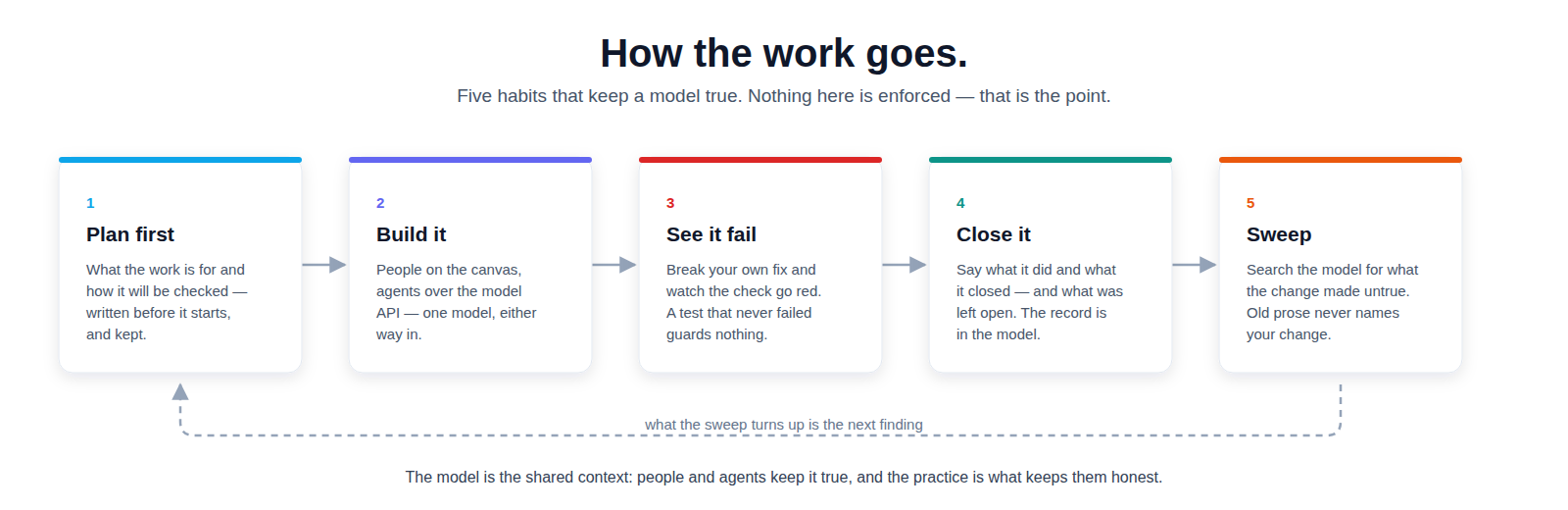
A model is worth keeping only while it is true. This is the practice we build Inwardis with, and the one the product teaches the agents that work in it.
The model is the shared context
People and agents read and write one place. A fact in a model can be queried, counted and re-verified; a fact in a document can only be re-read.
Point at the exact thing
Copy a link to one element and ask the agent what did you mean here? — or tell it to make that one clearer. No “the third paragraph of that file”: it opens what you are looking at.
File the finding when you hit it
One row, one paragraph, where it came from. By the end of the session you have worked around it and forgotten what it looked like.
Design it first, and keep the plan
Sketch the feature in the model before it is code — the parts, what they touch, what they must not break. Written afterwards a plan is a description; written first it is what you check the result against, and where the next reader finds what you chose not to do.
A guard is worth what it fails on
Break your own fix and watch the check go red. A test that passes against the defect it was written for is not a guard, and reading it will not tell you which kind you have.
Sweep for what the change made false
Search the model for the words naming what you changed. The prose that still describes the old behaviour never mentions your change, which is why only you can find it.
Code stays linked to the model
A one-line mark in a file ties a class to the element that describes it. Open either from the other in VS Code — and see at a glance when the code has moved on since its description was last checked.
The full chapter ships with the product, in the manual and the in-app help; agents are taught the same practice by the model API.
Simple pricing
One license. All features. No surprises.
or $96/year (save ~11%)
Your license never expires. The subscription keeps you on new versions — if it lapses, the version you have keeps working, fully editable, forever.
Your architecture stays yours
A model of your systems is among the most sensitive documents you own. Inwardis runs entirely on your infrastructure via Docker — no cloud dependency, no telemetry, no phone-home, not even for licensing. We never see your model, ever.
Which agent you connect is your decision too: MCP is a local endpoint on your own server, guarded by a scoped, revocable API key.